


Sora by OpenAI
4.612.61K Reviews
App Specs
- Version
- 1.2026.064
- Updated On
- License
- Free
- Downloads
- 1,000,000+
- Developer
- OpenAI
- Categories
- Social
- Platform
- Android
Screenshots
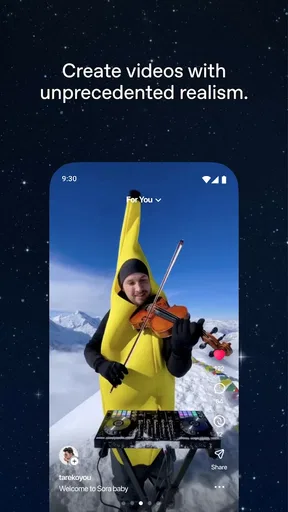
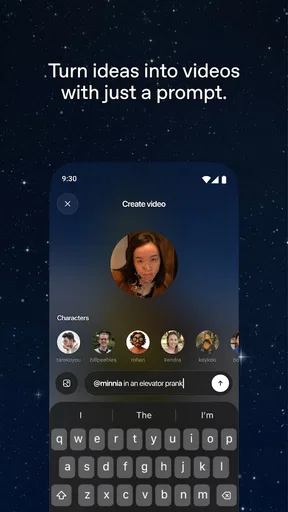
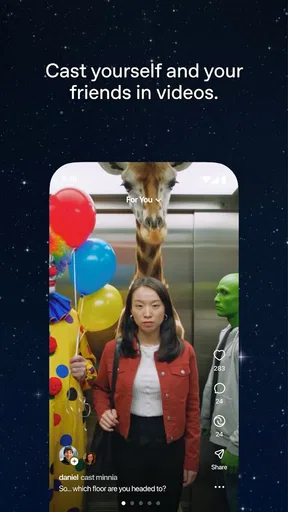
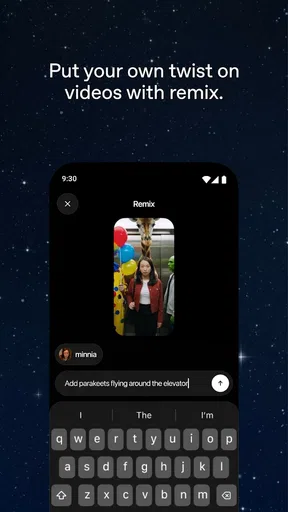
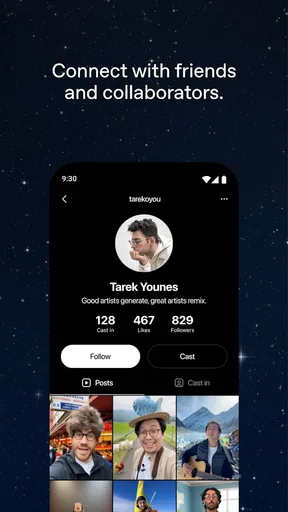
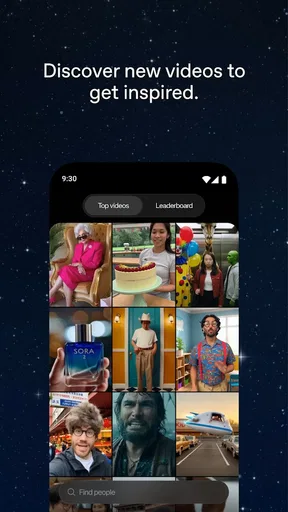
 Analysis by AppCompare
My first useful way to think about Sora by OpenAI is as a place to turn a written idea into a video, rather than as a general-purpose social network. That changes what I expect from it: I’m not opening it to message friends or polish footage I already shot. I’m opening it to explore how a scene might look when an AI interprets a description. For quick visual experiments, that is a distinctive reason to try it; for dependable editing or a finished production, it is a different kind of tool.
Turning a description into a moving image
The central appeal is AI video generation. Instead of starting with a camera roll full of clips, I can start with a scene in my head and describe it in words. That makes the creative starting point unusually accessible: I don’t need to know how to film the idea before I can see a version of it. The interesting part is not simply getting a video, but learning how specific language steers the result.
I’d treat each prompt as a small creative brief. A subject, its action, the setting, the mood, and a few visual details give the idea useful shape. If I ask for too many unrelated things at once, I make it harder to judge what the output got right. A more focused description gives me a clearer basis for deciding what to change next. This is a practical prompt-writing habit, not a promise that every detail will appear exactly as intended.
What a prompt-first workflow feels like
Using text as the starting material shifts effort from recording and editing toward describing and reviewing. That is a real advantage when I have a concept but no footage, location, actors, or camera setup. It is also a different kind of work: the first result is something to evaluate, not automatically the finished version. I need to be comfortable with interpretation and iteration rather than expecting the app to read my mind.
For a better first attempt, I’d write one clear scene instead of a paragraph full of competing directions. I’d name the main subject and action first, then add only the setting and visual tone that matter. If the result misses the point, I’d revise one part of the description at a time. That makes it easier to understand whether the problem was the action, the atmosphere, or an overloaded prompt. It also helps keep the process playful instead of turning every attempt into a complete rewrite.
A useful everyday creative scenario
Imagine I’m planning a small event and want a visual idea for a playful announcement, but I haven’t filmed anything and don’t want to spend the evening assembling clips. I can use a short description to explore a mood and see whether the concept feels lively, calm, or surreal. Even if the result is only a starting point, it may help me decide what kind of real footage to capture later—or give me a visual direction to discuss with someone else.
That scenario also shows where I’d draw the line. If the announcement must show an actual venue, a real person, or exact product details, I would not treat generated footage as proof of what those things look like. A creative interpretation can be useful for brainstorming but is not interchangeable with documentary footage. I’d use the app to explore an idea, then choose a conventional camera or editor when accuracy and direct control matter more.
Worth Reading Before You Choose

EA SPORTS FC Mobile 26 Is a Bigger Football Game, but It Takes Time

Flipboard Shows What News Apps Must Do Beyond the Feed

Switching to Android Auto Means Rethinking Your Driving Routine

Google Calendar Makes a Crowded Week Easier to Manage

Ludo King Makes the Most of the Minutes Between Plans

Baby Panda World Brings Quick Play to Modern Phones, but Its Game Library Feels Busy
Where it differs from familiar social and video apps
Most social video apps begin with a camera, existing clips, or a feed of other people’s posts. A standard mobile editor assumes I have footage and want to trim, arrange, or refine it. This app’s strongest distinction is that the creative input can begin as a description. That makes it more appealing to someone testing visual concepts than to someone whose main need is a polished timeline, precise cuts, or a straightforward place to publish ordinary phone videos.
The social setting still matters: this is a social app, not just an isolated creative utility. I’d approach the experience with the expectation that discovering and engaging with AI-made video is part of its context. If I only want to edit family clips or quickly share a recording, my existing gallery tools or a conventional editor are likely to feel more direct. If I want to see how a written idea can become moving imagery, the prompt-led approach is the reason to spend time here.
Small choices that improve the experience
One non-obvious trade-off is that a more elaborate prompt is not always a better prompt. I’d begin with the single visual point I care about most, then add detail only when it helps communicate that point. This gives me a way to judge the output without confusing “more descriptive” with “more controllable.” It also makes experiments easier to compare: I can adjust one element while keeping the basic concept intact.
I’d also decide what success means before generating anything. If I’m looking for inspiration, an unexpected interpretation can be a win. If I need a specific sequence or a consistent visual identity, variation becomes a drawback rather than a benefit. That distinction can save time: use it when exploration is valuable, and switch to tools with direct editing controls when precision is the task.
Another useful habit is to keep prompts suitable for the audience and setting where the result may be seen. The app has a Teen content rating, so it is not positioned as an adults-only experience. I would still review any generated video before sharing it, especially when a prompt involves sensitive subject matter or a real-world context. A quick human check is more sensible than assuming a creative tool has made the final judgment for me.
Who is likely to get the most from it
I think the best fit is someone who enjoys experimenting with visual ideas, wants to create without first recording footage, or finds it easier to describe a scene than to film one. It may also suit a creator who needs a rough concept to react to before committing to a more involved production. The value is in opening a different route into video-making, not in replacing every camera, editor, or design decision.
I’d recommend skipping it if the main goal is reliable control over every frame, practical editing of existing clips, or a quick utility that solves a routine phone task. It is also a poor match for anyone who dislikes trying, judging, and refining creative prompts. The process asks for curiosity and some tolerance for interpretation; people who want a predictable, hands-on timeline will probably be happier with a conventional video editor.
Cost, availability, and what to expect
The app is free to install, with in-app purchases listed at $4.00 per item. I’d check the purchase details in the app before committing, and think about whether I expect to experiment occasionally or use it often. The free starting point lowers the barrier to trying the idea, while paid items mean it is worth being deliberate about any spending rather than assuming every part of the experience has no cost.
It comes from OpenAI, the developer behind ChatGPT, and its video focus gives it a different role from a text assistant. The current version is 1.2025.351, and the listed minimum operating-system requirement is 7.0. It is rated 4.6 on average from around 87,000 ratings, with over 1 million installs. Those figures suggest plenty of people have tried it, but they can’t tell me whether a particular prompt will produce the result I have in mind; the best test is to start with a small, low-stakes idea.
Because it sits in a social category, I’d also consider whether I want a creative experience with a social dimension or simply a private tool for making clips. That preference can matter more than a feature checklist. Someone who likes seeing how other people approach AI-generated video may find the setting part of the appeal. Someone who wants a quiet production workspace may prefer a dedicated editor, even if it lacks this prompt-first starting point.
My take after weighing the trade-offs
Upon opening Sora by OpenAI, the interface greets you with a clean and modern design. It's super intuitive, which is always a plus. You know that feeling when an app just "gets it"? Yeah, that's what Sora does. Navigation is smooth, and everything you need is right at your fingertips without any unnecessary clutter.
Features That Stand Out
The app is packed with some pretty impressive features. One of the highlights is its ability to seamlessly integrate AI into everyday tasks. Whether you're looking to automate some of your to-dos or dive deep into AI-generated content, Sora's got you covered.
Customization is another strong suit here. You can tweak settings to your liking, ensuring the app works just the way you want it to. From adjusting AI sensitivity to setting up personalized alerts, it’s all about giving you control.
Performance and Usability
In terms of performance, Sora runs like a dream. No lagging or crashing, which is a huge relief. The developers clearly put a lot of thought into making this app stable and reliable. You can multitask without worrying about the app slowing down your device.
Usability is top-notch, too. The app's design is user-friendly, making it accessible for both tech newbies and seasoned pros. It’s one of those rare finds that caters to a wide audience without compromising on quality.
Why You Might Love It
If you’re an AI enthusiast or someone who loves to keep up with the latest tech trends, Sora is definitely worth checking out. The app’s sleek design and robust features make it a standout in the crowded app space. Plus, it’s a great way to dip your toes into the world of AI without feeling overwhelmed.
So, if you're ready to explore a new digital companion that can streamline your tasks and introduce you to the world of AI, give it a shot. It's like having a little piece of the future right in your pocket.
Hope you enjoy exploring all that Sora has to offer!
Pros
- User-friendly interface and design.
- Wide range of language support.
- Seamless integration with AI tools.
- Regular updates with new features.
- Fast and reliable customer support.
Cons
- Requires stable internet connection.
- Limited offline functionality.
- Some features need a subscription.
- Initial setup can be complex.
- Occasional lag on older devices.
FAQs for Sora by OpenAI
What is Sora by OpenAI and what does it offer?
Sora by OpenAI is an innovative application designed to enhance productivity and creativity. It leverages advanced AI technology to provide users with a seamless experience in content creation, task management, and idea generation. The app offers features like real-time collaboration, intuitive design tools, and personalized suggestions, making it a versatile tool for both individual and team projects.
Is Sora by OpenAI suitable for both personal and professional use?
Yes, Sora by OpenAI is designed to cater to a wide range of users, from individuals seeking to organize personal tasks to professionals managing complex projects. Its versatile features allow it to adapt to various needs, offering functionalities such as task scheduling, collaborative workspaces, and AI-driven insights, making it suitable for diverse use cases.
How does Sora by OpenAI ensure user data privacy and security?
Sora by OpenAI prioritizes user privacy and data security by implementing robust encryption protocols and secure data storage practices. Users can rest assured that their information is protected against unauthorized access. Additionally, the app adheres to industry-standard privacy regulations, ensuring that user data is handled with the utmost care and confidentiality.
What devices and platforms is Sora by OpenAI compatible with?
Sora by OpenAI is compatible with both Android and iOS devices, offering a seamless experience across smartphones and tablets. The app is optimized for various screen sizes and resolutions, ensuring a consistent and user-friendly interface. Additionally, it supports integration with popular productivity tools, enhancing its functionality across different platforms.
Are there any subscription fees or in-app purchases in Sora by OpenAI?
Sora by OpenAI offers a range of pricing plans to accommodate different user needs. While the basic version of the app is free, it provides optional in-app purchases and subscription plans for advanced features. These premium options include additional storage, enhanced collaboration tools, and exclusive AI functionalities, allowing users to tailor the app to their specific requirements.


